
Where the business stands, and where the cash is heading.
Business Overview puts stock, profit, production, factory spending, the cash forecast and ageing on one screen for the owner. The forecast works customer by customer, from how each of them has paid.
- 6Sections on Business Overview
- 4Customer tiers, a rule each
- ₹Billed kept apart from estimated
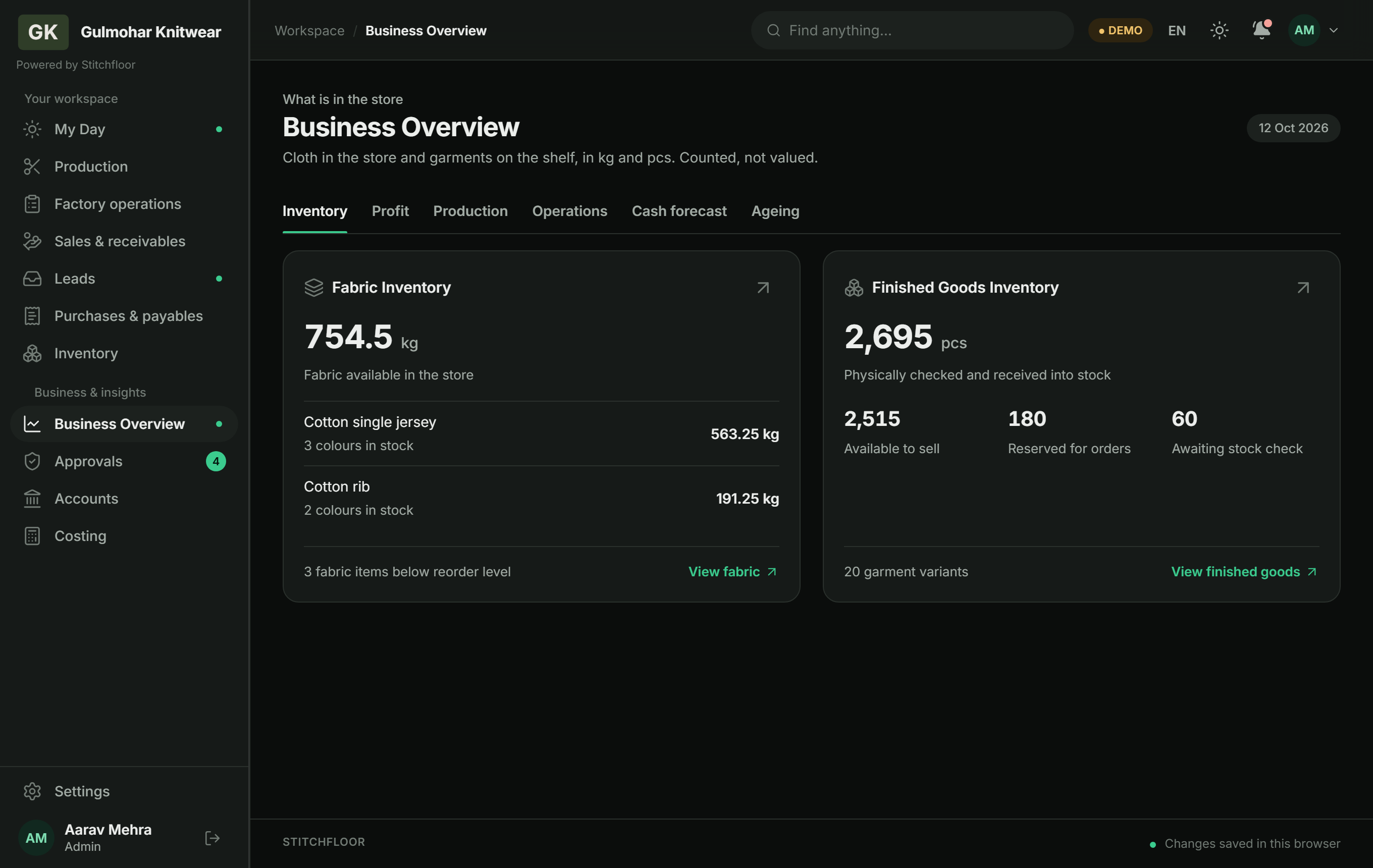
- Business Overview Inventory, Profit, Production, Operations, Cash forecast, Ageing
- Cash forecast The next week, month or year, party by party
- Customer tiers Model accounts, Big and slow, Mid and stuck, Small and stuck
- Catalogue and Leads A PDF or one online link for buyers; their enquiries land on Leads
The questions an owner asks, and the screen that answers.
Every figure here is worked out from records the desks already made. Nobody keeps a separate sheet for the owner.
-
What we hold
Business Overview: Inventory
Cloth in the store and garments on the shelf.
Fabric in kilograms by cloth and colour, and finished goods in pieces, split into available to sell, reserved for orders and awaiting a stock check. Counted, not valued.
-
What we made
Business Overview: Profit
Profit and margin by week, month or year.
The estimate is built from sales, returns and costs already in the books, for whichever period you pick.
-
On the floor
Business Overview: Production and Operations
The pipeline and what the factory is spending.
How much work sits at each stage, which lots are out at a printer, and what has gone through the factory cash book.
-
Cash ahead
Business Overview: Cash forecast
Cash and bank today, and at the end of the period.
Money expected in and out over the next week, month or year, and the balance it leaves. Each customer is expected to pay as late as they have paid before; one with no history is expected on the due date. What is already billed is shown apart from what is estimated from new sales.
-
Who owes
Business Overview: Ageing
What is owed to you and by you, and for how long.
Receivables and payables in age bands, so the old money is seen before the new.
-
Who to chase
Sales & receivables: Tiers
Four tiers, each with what to do about it.
Customers sorted by how much they owe, for how long, and how much of your sales they are. Each tier carries its own rule, set out below.
-
End of season
Inventory: Dead stock
Old designs, turned into something to send buyers.
Filter finished goods to designs that have not moved for the number of days you set and pick them from a shelf of photos. Print the catalogue as a PDF with your brand, or publish it online as one link anyone can open. Buyers see design numbers, sizes and photos, never prices, stock counts or customers, and their enquiries land on Leads. Take it offline when the stock is gone.
See the cash before it arrives.
The forecast reads how each customer and each creditor has paid, and lays the next period out bar by bar: money in above the line, money out below, and what is left once both are counted.
- Expected out includes creditors, factory expense, and wages and salaries
- Disputed and unverified payments are left out of a customer's history
- The weeks before today show the cash book as it was recorded

Know which customers to reward and which to chase.
Customer tiers turn the receivables ledger into four groups, so the owner and the sales desk treat the same customer the same way.
- Each tier shows its accounts, its share of sales and what is owed
- Days owed are weighted by bill size
- Tiers can be worked out over a period you choose
- Sales and money owed by state, and by invoice series

A rule for each kind of customer.
Money counts as stuck once it is past 60 days and large enough to matter, or when goods coming back reach a quarter of what was billed. The rules are the ones the screen prints.
| Tier | Who lands here | The rule |
|---|---|---|
| Model accounts | Nothing stuck and few returns, whatever their size. | Reward, do not chase. First on the cash-discount list and first to see new designs. |
| Big and slow | Money stuck or heavy returns, and 6% or more of your sales. | No pressure on the old balance. Change only what happens on the next order. |
| Mid and stuck | Money stuck or heavy returns, and 2% to 6% of your sales. | The real target. Instalment plan, part payment at dispatch, a dated instrument. |
| Small and stuck | Money stuck or heavy returns, and under 2% of your sales. | No relationship to protect. Be direct, take instalments, supply on clearance. |
Thresholds as the demo's Tiers screen states them.
Put the catalogue online, and follow up every enquiry.
Pick designs under Inventory, Finished goods, Make a catalogue, with the dead-stock filter if you only want old stock. Print it as a PDF, or publish it online as one link anyone can open.
The online catalogue
One link for buyers, shared on WhatsApp in one tap.
- Publish online: one link anyone can open, with nothing for the buyer to sign up for
- Share on WhatsApp opens WhatsApp with the link, and you press send
- Buyers see design numbers, sizes and photos; never prices, stock counts, customers or paperwork
- Take it offline when the stock is gone, and the link stops showing it
Leads
Every enquiry from the catalogue lands here, on the admin's desk and the Sales desk.
- New, follow-ups due, being followed up, won and lost
- What buyers ask for most, against what is still on the shelf
- A WhatsApp reply drafted with the designs they asked about, sent by you
- A follow-up date and a note on each enquiry, and a CSV download
The online catalogue and Leads are in the demo now: sign in as admin.demo. On a live workspace (your company's own Stitchfloor, as opposed to the public demo) they work after a one-time setup step. Publishing is on the admin's desk in the web app, not the Android app, and the public catalogue page is in English only.
What Intelligence does not do yet.
Two of these are on the plan card with a Coming soon tag. Neither is in the product today.
- No AI-written analysis. Coming soon Today the figures are calculated and the cash advice follows fixed rules.
- No WhatsApp agent. Coming soon No entries come in over WhatsApp. Today WhatsApp is for sharing: the catalogue link, and a drafted reply to a lead, sent by you.
- The forecast is not a promise. It is statistical, from each party's own payment history, and as good as that history.
- Stock is counted, not valued. The inventory view is kilograms and pieces, not rupees.
- No budgets or sales targets. Business Overview reports what happened and what is expected.
- Nothing is sent for you. The catalogue is a PDF or a link you share; reminders and lead replies are drafts you send.
- Essentials ₹6,999 (not included)
- Factory ₹11,999 (not included)
- Intelligence ₹14,499
Before you trust a forecast.
Is this AI?
No. The cash forecast is statistical, worked out from how each customer and creditor has paid. The tiers and the cash advice are fixed rules you can read on the screen.
AI-written analysis of your numbers is coming soon. It is not in the product today.
How good is the forecast?
As good as the payment history behind it. A customer who has settled bills before is expected to pay as late as they usually do; one with no settled bills is expected on the due date. Disputed and unverified payments are kept out of the history, and billed amounts are shown apart from estimates.
Who can see Business Overview?
It is on the admin's desk. The floor and sales desks work on their own screens.
Can it message my customers on WhatsApp?
Not on its own. You can share the catalogue link and reply to a lead on WhatsApp in one tap, and you press send. A WhatsApp agent that takes entries is coming soon. Payment reminders are drafts you copy.
Can buyers see my prices or stock?
No. The public catalogue page shows design numbers, sizes and photos only. Prices, stock counts, customers and paperwork never appear on it. It is open to anyone with the link until you take it offline.
Can I try it in the demo?
Yes. Sign in as admin.demo with the password Stitchfloor@123 and open Business Overview. The sample factory has a month of records behind every figure, and the online catalogue and Leads are there too.
Open Business Overview on the sample factory.
Every tab works in the demo, worked out from a month of sample records, and so do the online catalogue and Leads.
demo.stitchfloor.com: sign in as
admin.demo with the password
Stitchfloor@123.